Streaming Analytics with Styx
How to get fast predictions from real-time data
with Flink, Kafka, and Cassandra
Bas Geerdink | Big Data Meetup | 03-05-2018
Agenda
- Streaming Analytics use cases
- Architecture and Technology
- Deep dive:
- Kafka-Flink connection
- Parallel processing
- Event Time, Windows, and Watermarks
- Exactly-once Processing
- Model scoring
- Wrap-up
Use Cases
| Sector | Data source | Pattern + prediction | Notification |
|---|---|---|---|
| Finance | Debit card transactions | Running out of credit | Actionable insight |
| Finance | Payment data | Fraud detection | Block money transfer |
| Insurance | Page visits | Customer is stuck in form | Chat window |
| Healthcare | Patient data | Heart failure | Alert doctor |
| Retail | Tweets | Sentiment analysis | Social media response |
| Traffic | Number of cars passing | Traffic jam | Update route info |
| Manufacturing | Logs | System failure | Alert to sys admin |
Streaming Analytics Pattern
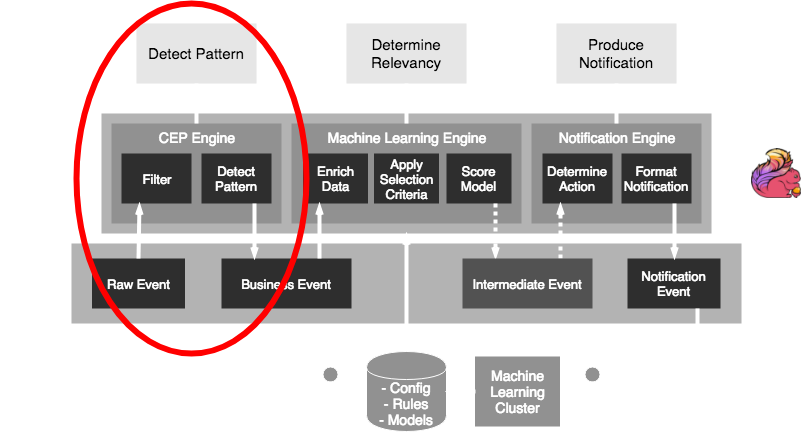
The common pattern in all these scenarios:- Detect pattern by combining data (CEP)
- Determine relevancy (ML)
- Produce notification
Architecture

Technology
Styx uses a selection of source frameworks- Data stream storage: Kafka
- Stream processing: Flink
- Persisting rules, models, and config: Cassandra
- Model scoring: PMML and Openscoring.io
Deep dive part 1
Set up a Flink application
- A Flink job is a Java/Scala application
- Jobs (.jar) can be deployed to a running Flink cluster
- Maven dependencies:
                      org.apache.flink
                      flink-scala_2.11
                      1.5.0
                      provided


                      org.apache.flink
                      flink-streaming-scala_2.11
                      1.5.0
                      provided
Flink-Kafka integration
The FlinkKafkaConsumer and FlinkKafkaProducer classes provide easy connectivity
def createKafkaEventStream(env: StreamExecutionEnvironment):
      DataStream[RawEvent] = {

    // create KeyedDeserializationSchema
    val readSchema = KafkaSchemaFactory.createKeyedDeserializer
            (readTopicDef, rawEventFromPayload)

    // consume events
    val rawEventSource = new FlinkKafkaConsumer010[BaseKafkaEvent]
            (toStringList(readTopicDef), readSchema, props)

    // create source
    env.addSource(rawEventSource)
      .filter(_.isSuccess)   // if decrypting from kafka succeeded
      .flatMap(_.toOption)
}
Parallelism
- To get high throughput, we have to process the events in parallel
                    taskmanager.numberOfTaskSlots: 4
                    parallelism.default: 2
- The keyBy function distributes our stream into parallel parts
                      def createCepPipeline(sourceStream: DataStream[RawEvent]):
                            DataStream[BusinessEvent] = {
                        val windowStream = sourceStream
                          .keyBy(_.customerId.head)           // create parallelism: 0..9
                          .window(GlobalWindows.create())     // window per key
                          .apply(new WindowResultFunction())  // logic: pattern match
                          .map(event => event.addTimeStamp("window"))
                      }
Event time
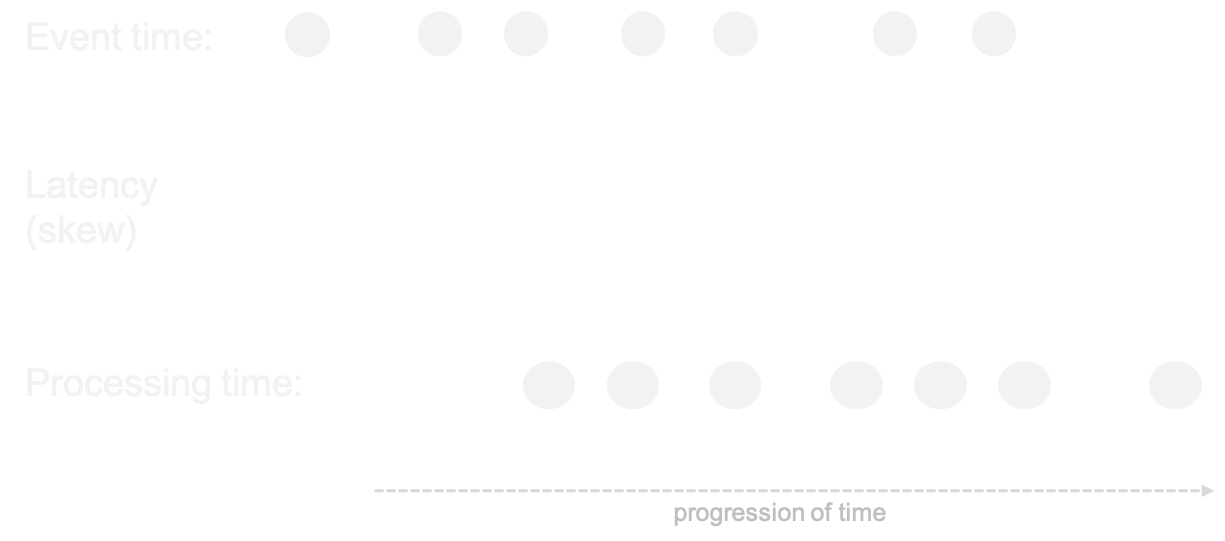
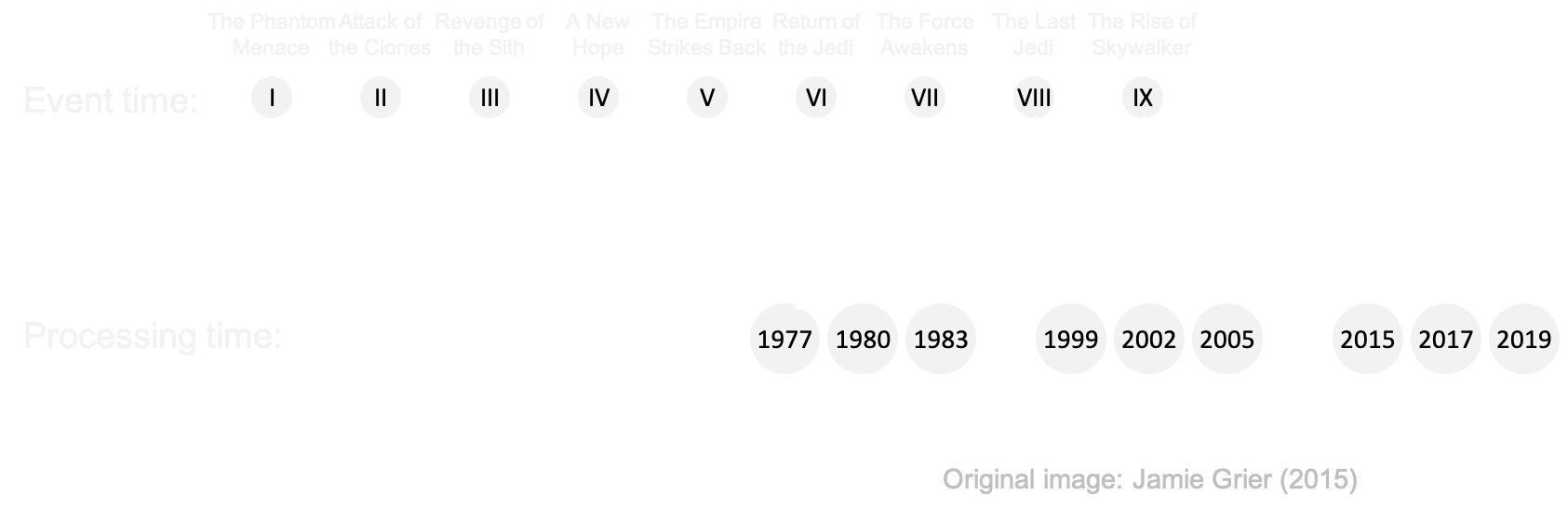
- Events occur at certain time => event time
- ... but arrive a little while later => processing time
env.setStreamTimeCharacteristic(TimeCharacteristic.EventTime)
Out-of-orderness

Windows
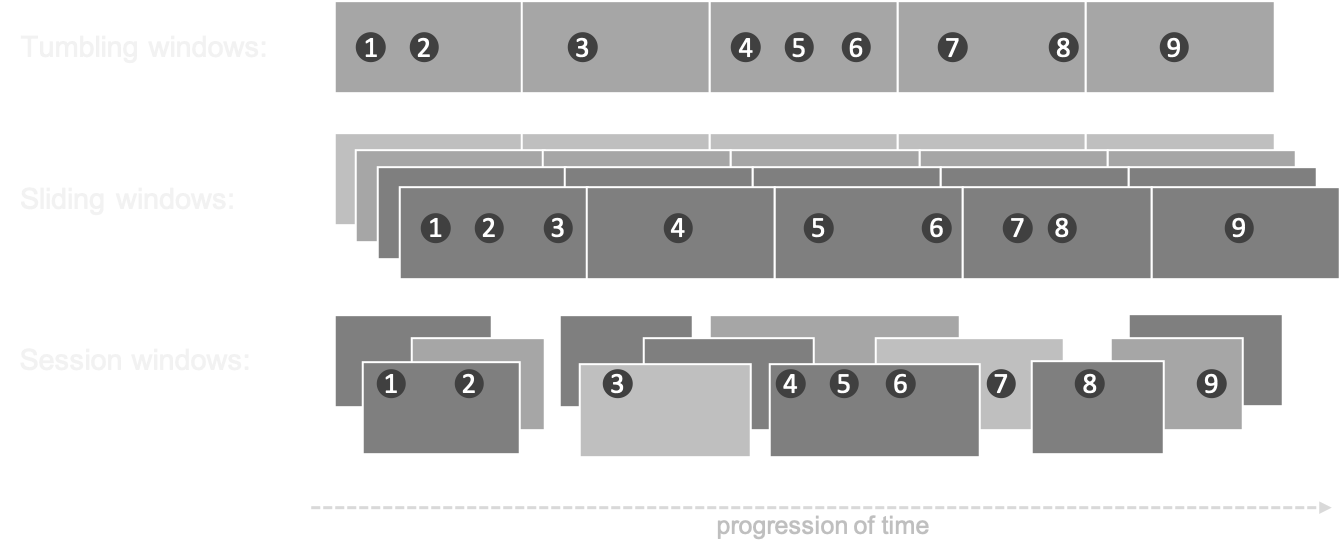
- In processing infinite streams, we usually look at a time window
- A windows can be considered as a bucket of time
- There are different types of windows:
- Sliding window
- Tumbling window
- Session window
Windows
Exactly-once processing
- An event has three possible statuses:
- Not processed (in cache on the Kafka bus)
- In transit (picked up by Flink, in a window) = state
- Processed (handled by Flink)
- Kafka knows for each consumer which data has been read: offset
- Flink has checkpoints that allow to replay the stream in case of failures
- This combination guarantees that an event goes through the system exactly once
Savepointing and checkpointing
- A checkpoint is a periodic dump to file of the in-memory state
env.enableCheckPointing(10000) // checkpoint every 10 seconds
- A savepoint is a manual checkpoint
- The state dumps can be used for recovery and replay
    # Supported backends: jobmanager, filesystem, rocksdb
    #
    state.backend: filesystem
Upgrading a Flink job
                    # show the current list of jobs: gives job id
                    /flink/bin/flink list

                    # create a savepoint
                    /flink/bin/flink savepoint [JOB_ID]

                    # wait for response: gives savepoint id
                    /flink/bin/flink cancel [JOB_ID]

                    # start the new job
                    /flink/bin/flink run -p 4 \
                        -s jobmanager://savepoints/[SAVEPOINT_ID] \
                        -c ai.styx.StyxAppJob styx-app-0.0.1.jar \
                        --config /opt/flink/jars/reference.conf
Flink CEP
val cep = Pattern.begin[ClickEvent]("Page1").within(Time.seconds(1))
    .where( event =>
        event match {
          case c: ClickEvent => c.processStep.equals(steps(0))
          case _ => false
        })
    .next("Page2")  // check that Page1 is followed by Page2
      .where(event => event match {
          case c: ClickEvent => c.processStep.equals(steps(1))
          case _ => false
        })
    .next("Page3")  // check that Page2 is followed by Page3
    .where(event => event match {
        case c: ClickEvent => c.processStep.equals(steps(2))
        case _ => false
      })
    .within(Time.minutes(30))  // no match = pattern detected
  }
Deep dive part 2

PMML
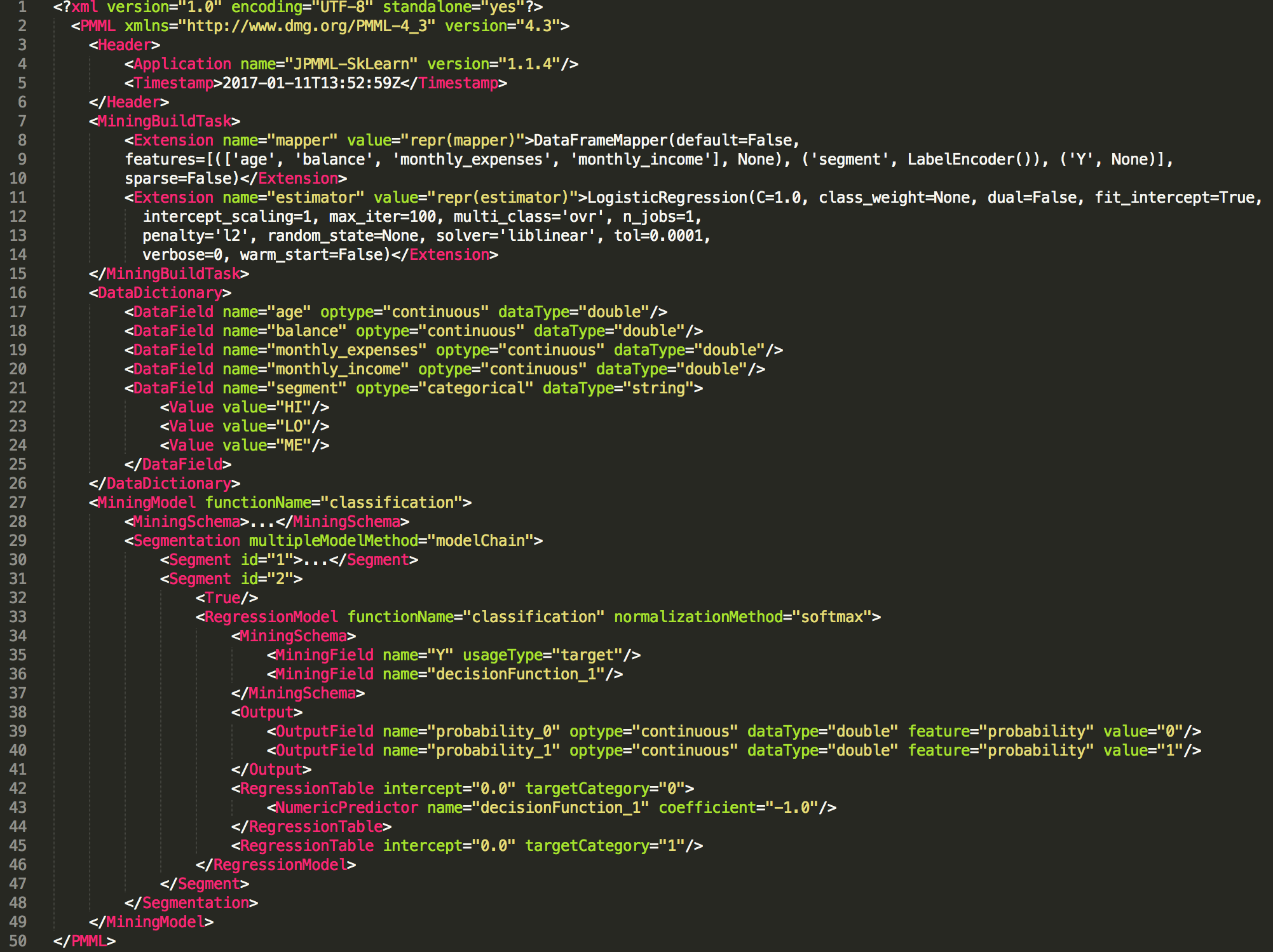
- Data scientists who build and train a machine learning model can export it to PMML (or PFA) format
from sklearn.linear_model import LogisticRegression
from sklearn2pmml import sklearn2pmml

events_df = pandas.read_csv("events.csv")

pipeline = PMMLPipeline(...)
pipeline.fit(events_df, events_df["notifications"])

sklearn2pmml(pipeline, "LogisticRegression.pmml", with_repr = True)
PMML
Model scoring
- By doing a flatMap over the events we can apply functions that process/transform the data in the windows
- For example:
- enrich each business event by getting more data
- filtering events based on selection criteria (rules)
- score a machine learning model on each event
- write the outcome to a new event / output stream
Openscoring.io
                def score(event: RichBusinessEvent, pmmlModel: PmmlModel): Double = {
                    val arguments = new util.LinkedHashMap[FieldName, FieldValue]

                    for (inputField: InputField <- pmmlModel.getInputFields.asScala) {
                        arguments.put(inputField.getField.getName,
                            inputField.prepare(customer.all(fieldName.getValue)))
                    }

                    // return the notification with a relevancy score
                    val results = pmmlModel.evaluate(arguments)

                    pmmlModel.getTargetFields.asScala.headOption match {
                        case Some(targetField) =>
                            val targetFieldValue = results.get(targetField.getName)
                        case _ => throw new Exception("No valid target")
                        }
                    }
                }
Wrap-up
- There are plenty of streaming analytics use cases, in any business domain
- The common pattern is: CEP → ML → Notification
- Pick the right tools for the job; Kafka and Flink are amongst the best
- Be aware of typical streaming data issues: late events, state management, distribution
- Styx is a proven open source framework for Streaming Analytics that is flexible and scalable
Thanks!
Read more about streaming analytics at:
Source code and presentation is available at: