Fast data with the
KISSS stack
Bas Geerdink | September 25, 2019 | Strata New York
Who am I?
                {
                  "name": "Bas Geerdink",
                  "role": "Technology Lead",
                  "background": ["Artificial Intelligence",
                                 "Informatics"],
                  "mixins": ["Software engineering",
                             "Architecture",
                             "Management",
                             "Innovation"],
                  "twitter": "@bgeerdink",
                  "linked_in": "bgeerdink"
                }
Agenda
- Fast Data use cases
- Architecture and Technology
- Deep dive:
- Event Time, Windows, and Watermarks
- Model scoring
- Wrap-up
Big Data
- Volume
- Variety
- Velocity
Fast Data Use Cases
| Sector | Data source | Pattern | Notification |
|---|---|---|---|
| Marketing | Tweets | Trend analysis | Actionable insights |
| Finance | Payment data | Fraud detection | Block money transfer |
| Insurance | Page visits | Customer is stuck in form | Chat window |
| Healthcare | Patient data | Heart failure | Alert doctor |
| Traffic | Cars passing | Traffic jam | Update route info |
| Internet of Things | Machine logs | System failure | Alert to sys admin |
| Gaming | Player actions | Key combos | Action on screen |
Fast Data Pattern
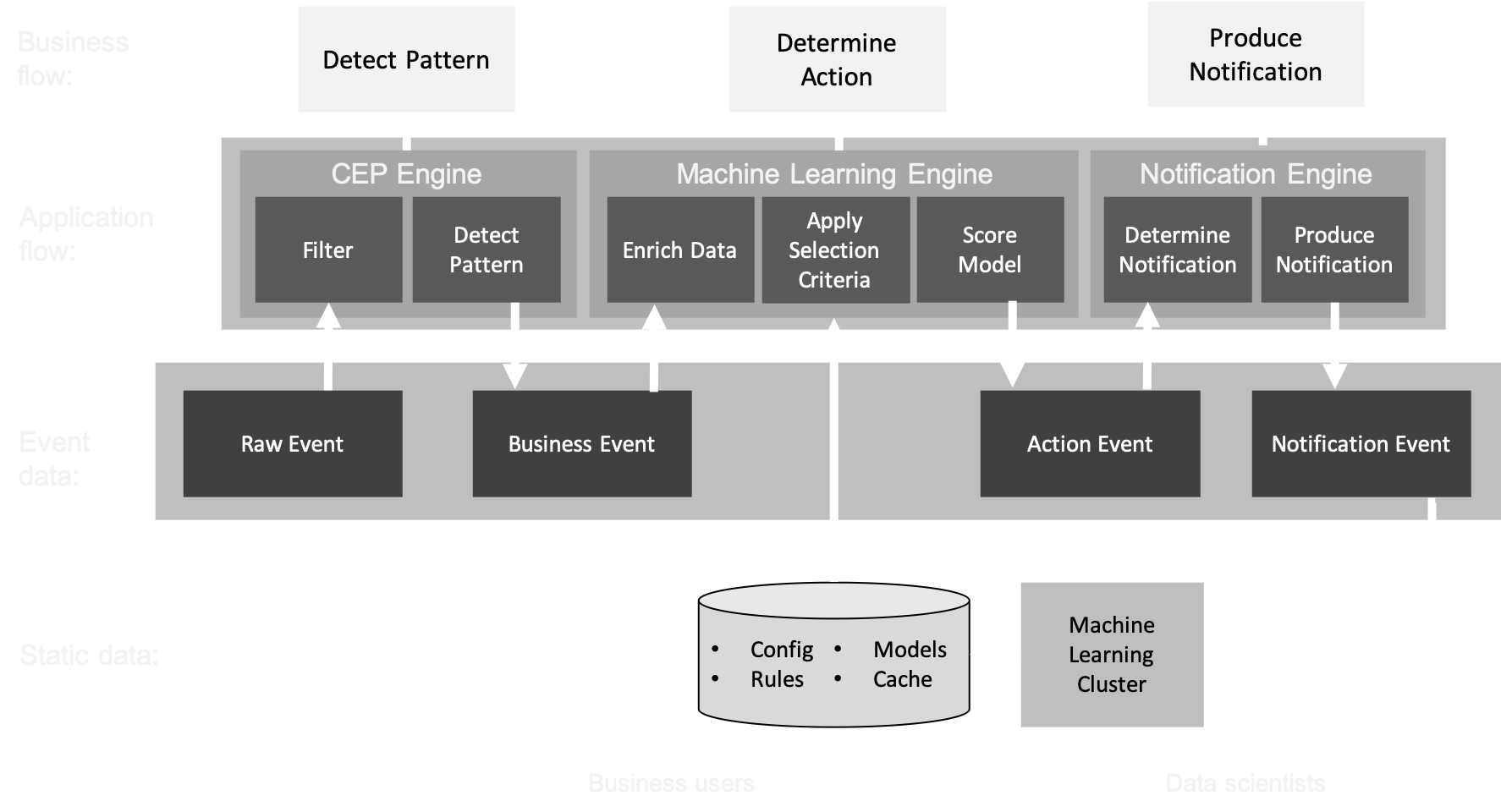
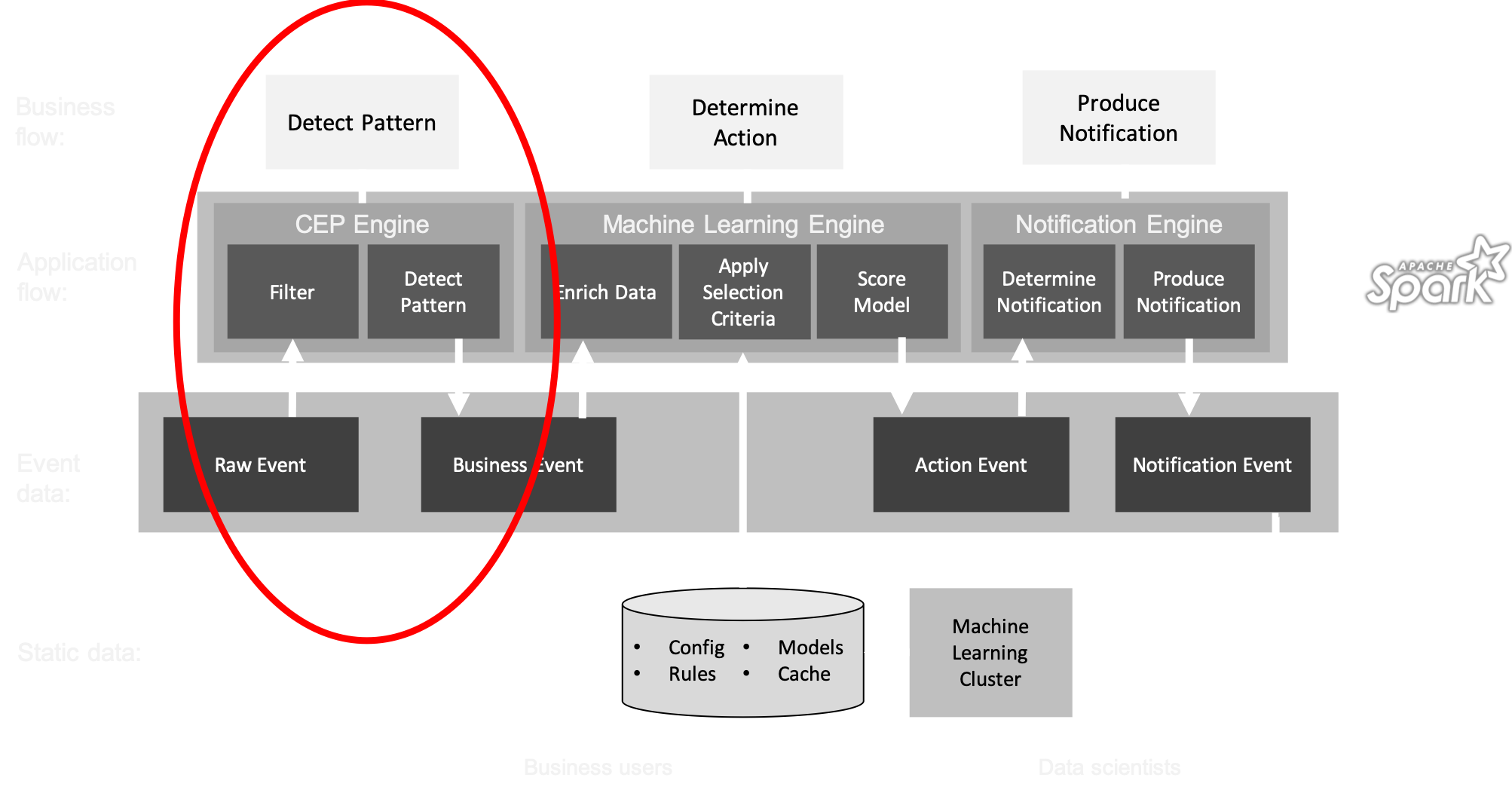
The common pattern in all these scenarios:- Detect pattern by combining data (CEP)
- Determine relevancy (ML)
- Produce follow-up action
Architecture
The KISSS stack
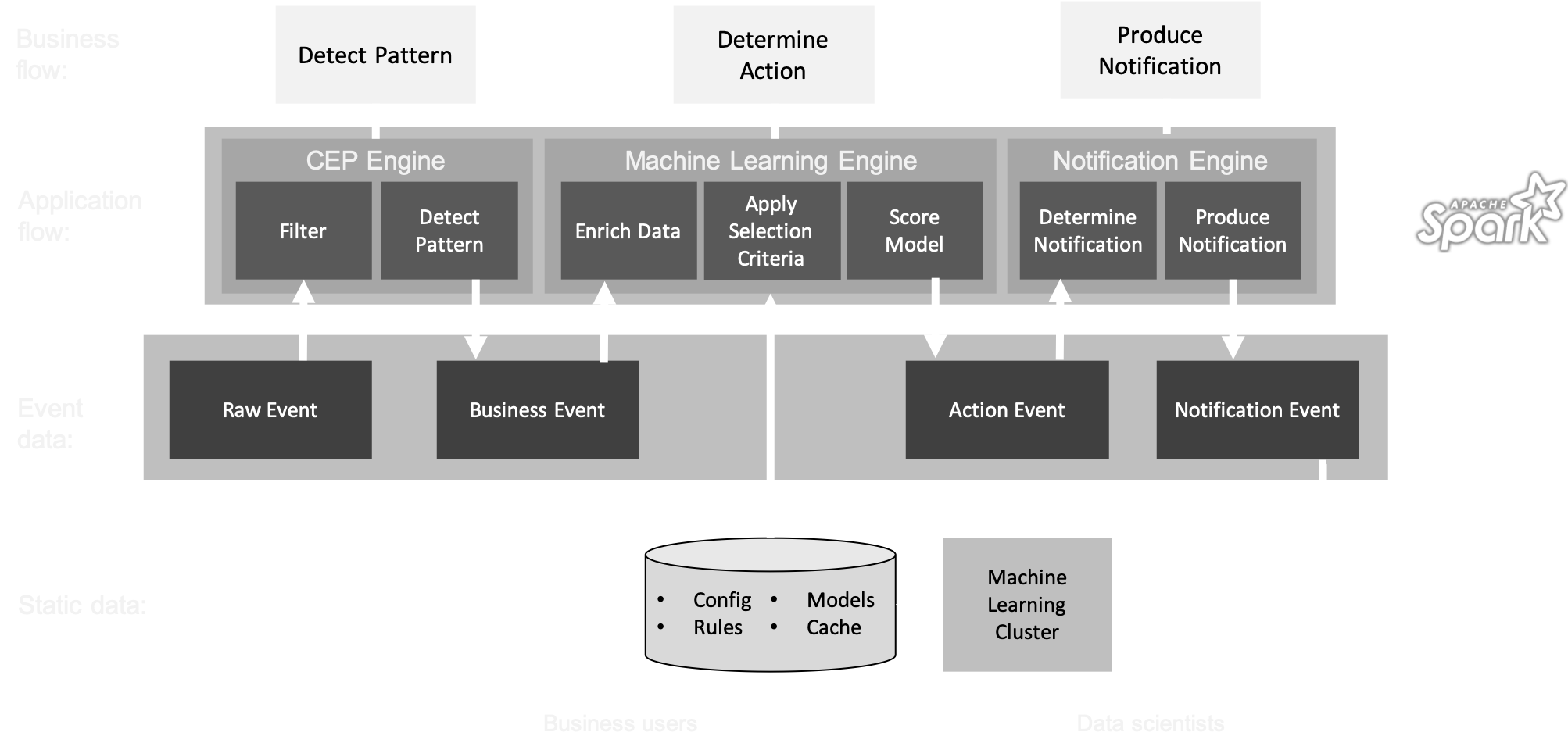
- Data stream storage: Kafka
- Persisting cache, rules, models, and config: Ignite
- Stream processing: Spark Structured Streaming
- Model scoring: PMML and Openscoring.io
KISSS Architecture
Deep dive part 1
Spark-Kafka integration
- A Fast Data application is a running job that processes events in a data store (Kafka)
- Jobs can be deployed as ever-running pieces of software in a big data cluster (Spark)
- The basic pattern of a job is:
- Connect to the stream and consume events
- Group and gather events (windowing)
- Perform analysis (aggregation) on each window
- Write the result to another stream (sink)
Parallelism
- To get high throughput, we have to process the events in parallel
- Parallelism can be configured on cluster level (YARN) and on job level (number of executors)
spark.executor.cores=2, spark.task.cpus=1
  val conf = new SparkConf()
    .setMaster("local[2]")
    .setAppName("Styx")
Hello speed!
  // connect to Spark
  val spark = SparkSession
    .builder
    .config(conf)
    .getOrCreate()

  import spark.sqlContext.implicits._

  // get the data from Kafka: subscribe to topic
  val df = spark
    .readStream
    .format("kafka")
    .option("kafka.bootstrap.servers", "localhost:9092")
    .option("subscribe", "tweets")
    .option("startingOffsets", "earliest")
    .load()
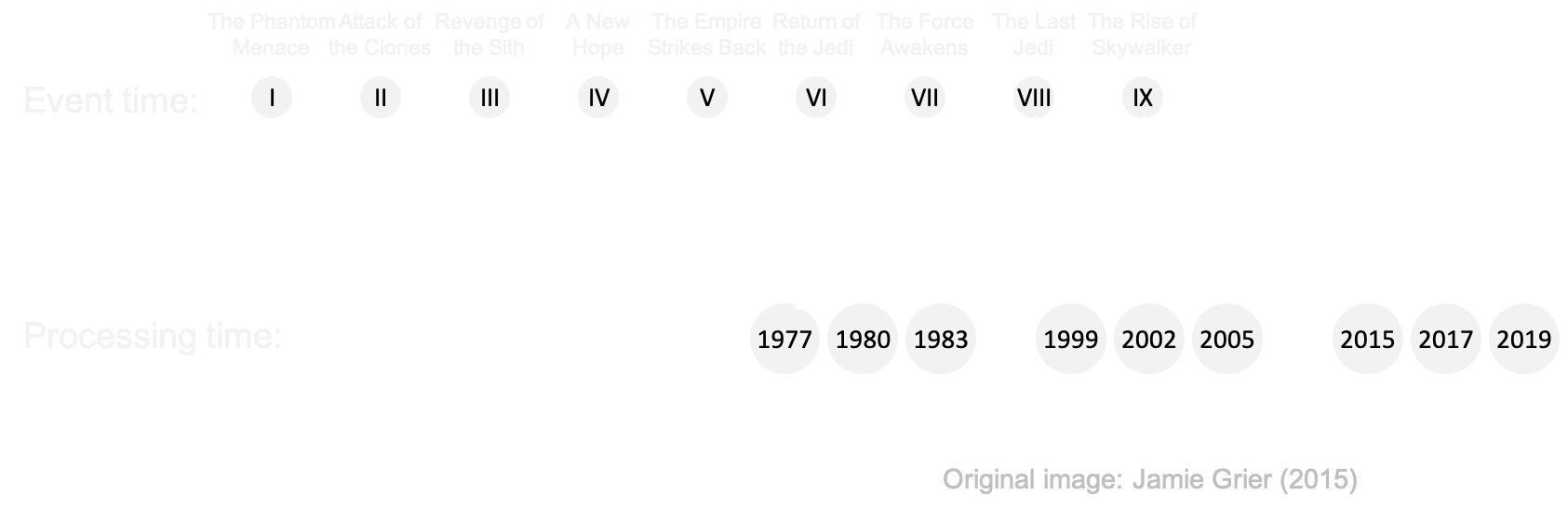
Event time
- Events occur at certain time ⇛ event time
- ... and are processed later ⇛ processing time
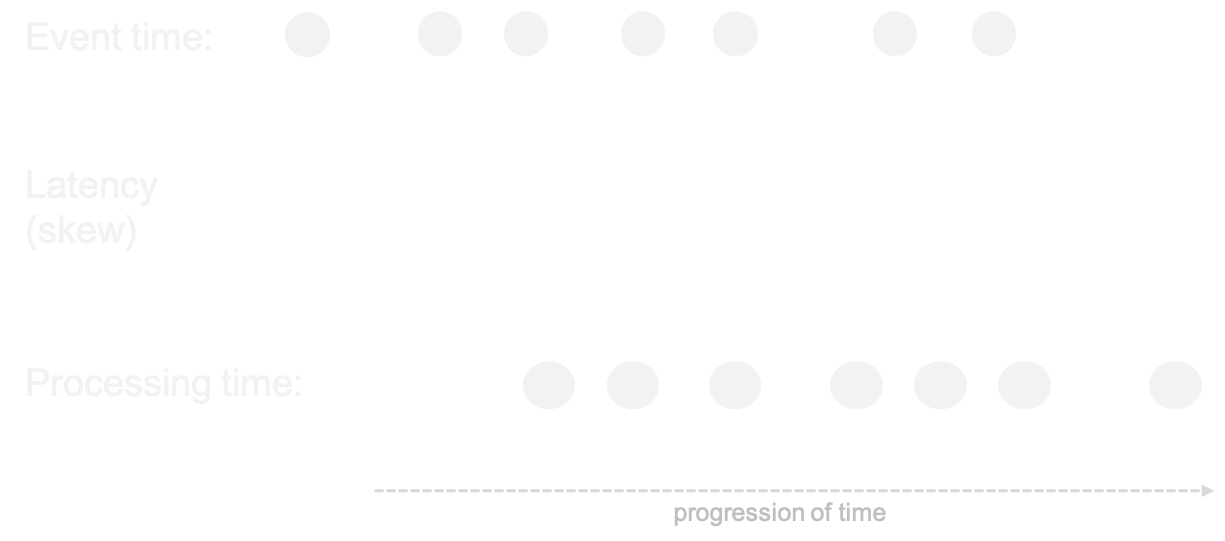
Out-of-orderness

Windows
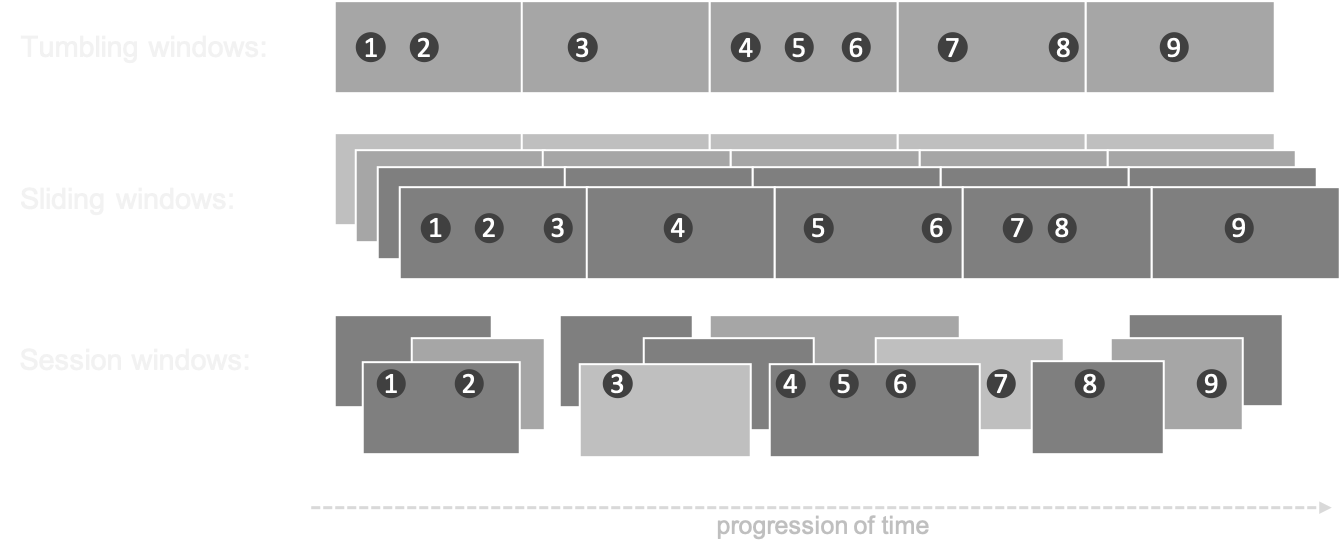
- In processing infinite streams, we usually look at a time window
- A windows can be considered as a bucket of time
- There are different types of windows:
- Sliding window
- Tumbling window
- Session window
Windows
Window considerations
- Size: large windows lead to big state and long calculations
- Number: many windows (e.g. sliding, session) lead to more calculations
- Evaluation: do all calculations within one window, or keep a cache across multiple windows (e.g. when comparing windows, like in trend analysis)
- Timing: events for a window can appear early or late
Windows
Example: sliding window of 1 day, evaluated every 15 minutes over the field 'customer_id'. The event time is stored in the field 'transaction_time'
  val windowedTransactions = transactionStream
    .groupBy(
      window($"transaction_time", "1 day", "15 minutes"),
      $"customer_id")
Watermarks
- Watermarks are timestamps that trigger the computation of the window
- They are generated at a time that allows a bit of slack for late events
- Any event that reaches the processor later than the watermark, but with an event time that should belong to the former window, is ignored
Event Time and Watermarks
Example: sliding window of 60 seconds, evaluated every 30 seconds. The watermark is set at 1 second, giving all events a second of event time to arrive
  val windowedTweets = tweetStream
    .withWatermark("created_at", "1 second")
    .groupBy(
      window($"created_at", "60 seconds", "30 seconds"),
      $"word")
Deep dive part 2
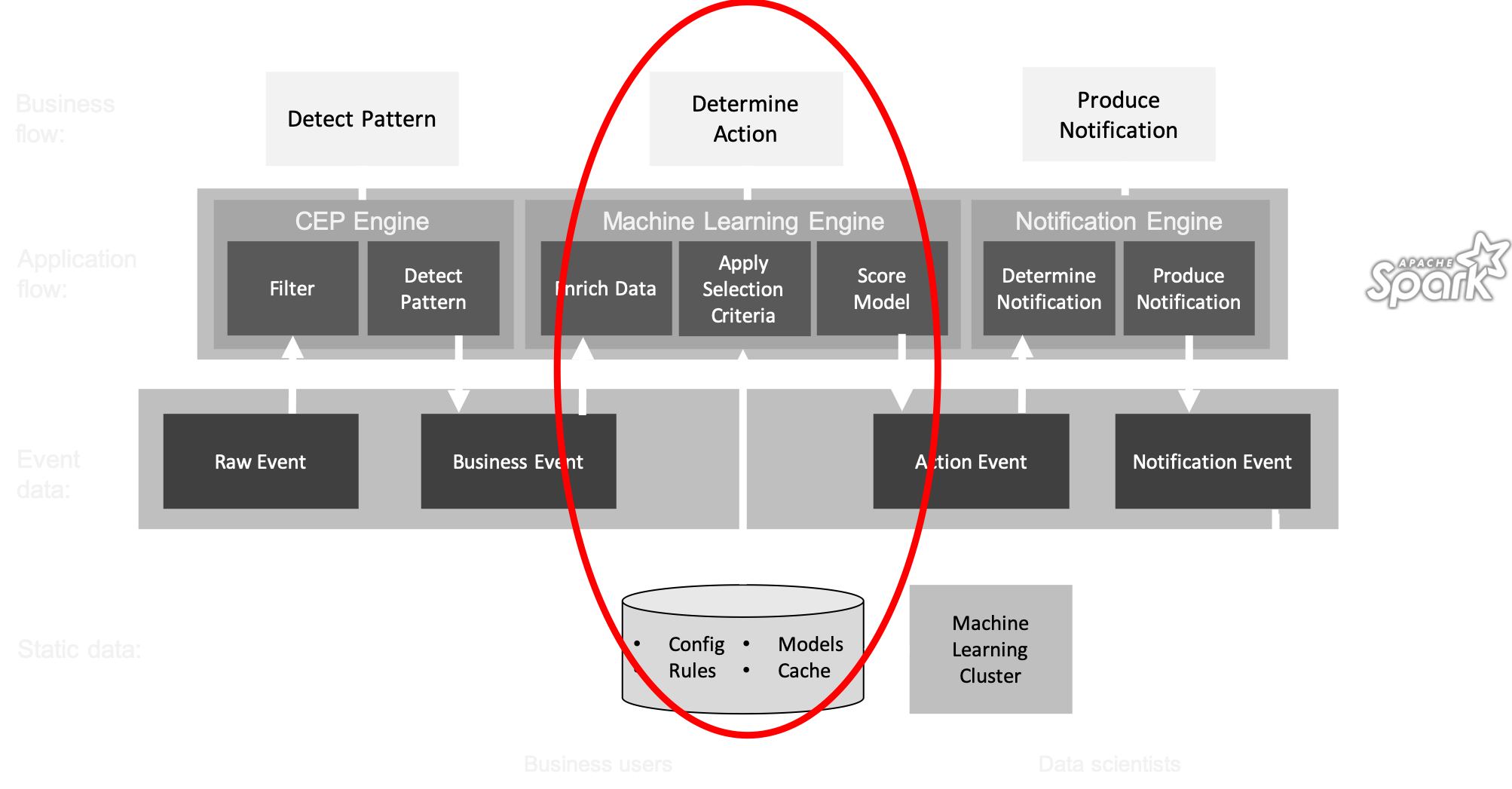
Model scoring
- To determine the follow-up action of a aggregated business event (e.g. pattern), we have to enrich the event with customer data
- The resulting data object contains the characteristics (features) as input for a model
- To get the features and score the model, efficiency plays a role again:
- In-memory data cache > API call
- In-memory model cache > model on disk
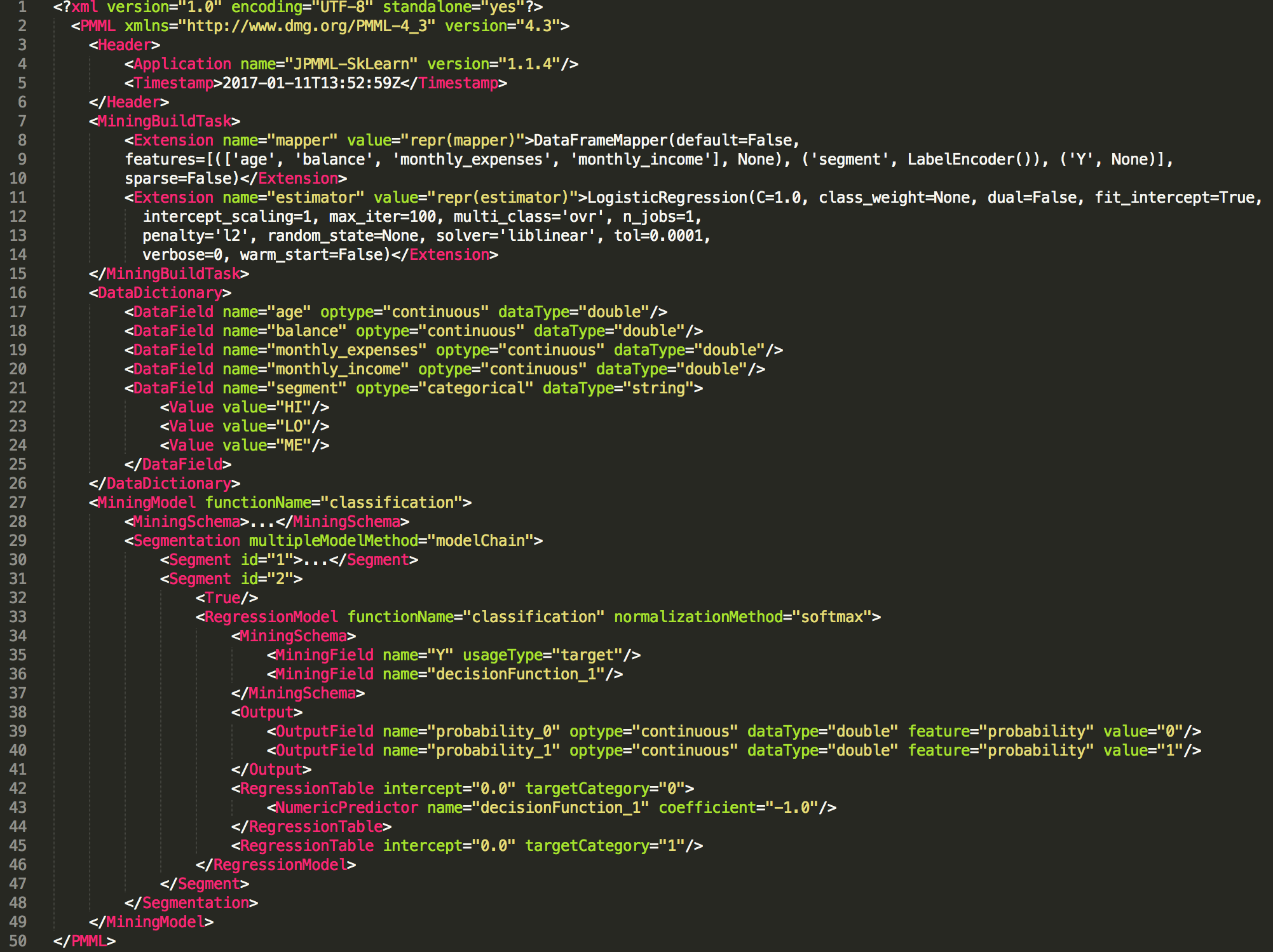
PMML
- PMML is the glue between data science and data engineering
- Data scientists can export their machine learning models to PMML (or PFA) format
from sklearn.linear_model import LogisticRegression
from sklearn2pmml import sklearn2pmml

events_df = pandas.read_csv("events.csv")

pipeline = PMMLPipeline(...)
pipeline.fit(events_df, events_df["notifications"])

sklearn2pmml(pipeline, "LogisticRegression.pmml", with_repr = True)
PMML
Model scoring
- The models can be loaded into memory to enable split-second performance
- By applying map functions over the events we can process/transform the data in the windows:
- enrich each business event by getting more data
- filtering events based on selection criteria (rules)
- score a machine learning model on each event
- write the outcome to a new event / output stream
Openscoring.io
                def score(event: RichBusinessEvent, pmmlModel: PmmlModel): Double = {
                    val arguments = new util.LinkedHashMap[FieldName, FieldValue]

                    for (inputField: InputField <- pmmlModel.getInputFields.asScala) {
                        arguments.put(inputField.getField.getName,
                            inputField.prepare(customer.all(fieldName.getValue)))
                    }

                    // return the notification with a relevancy score
                    val results = pmmlModel.evaluate(arguments)

                    pmmlModel.getTargetFields.asScala.headOption match {
                        case Some(targetField) =>
                            val targetFieldValue = results.get(targetField.getName)
                        case _ => throw new Exception("No valid target")
                        }
                    }
                }
Wrap-up
- There are plenty of streaming analytics use cases, in any business domain
- The common pattern is: CEP → ML → Notification
- Pick the right tools for the job; Kafka, Ignite, and Spark are amongst the best
- Be aware of typical streaming data issues: late events, state management, windows, etc.
Thanks!
Please rate my session on the website or app :)
Read more about streaming analytics at:
Source code and presentation are available at:
